
The Drafting Pro add-on
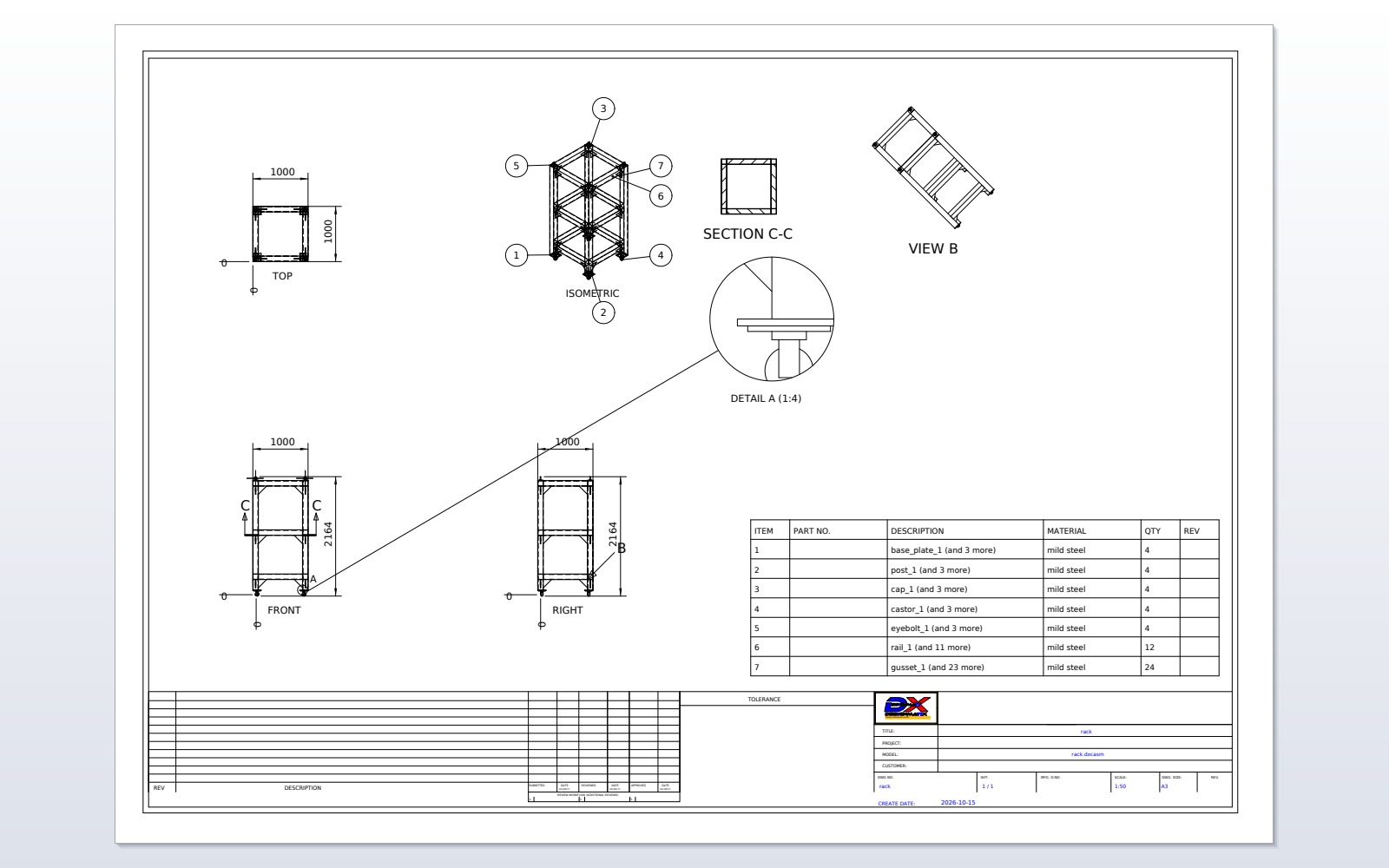
Dimensions, balloons, hole tables, tolerances and GD&T, section, detail and exploded views, for the drawings DX-CAD makes.
Download the 30-day free trial See pricing
What is in DX-CAD, and what Drafting Pro adds
- In DX-CAD itself. Drawing documents, title blocks and parts lists, to PDF and DXF.
- In Drafting Pro. Dimensions, balloons, hole tables, tolerances and GD&T, section, detail and exploded views, revision tables and notes.
Its commands
These are the commands of Drafting Pro, as DX-CAD lists them in its menus and in command search:
Dimensions - Drafting Pro: Place dimensions on a drawing's views by picking edges and points.Balloons - Drafting Pro: Number the parts on a drawing with balloons that match its parts list.Hole tables - Drafting Pro: List a view's holes in a table, with their positions and sizes.Tolerances - Drafting Pro: Give a dimension its limits or fits.GD&T frames and datums - Drafting Pro: Add geometric tolerance frames and datum symbols.Surface texture and weld symbols - Drafting Pro: Add surface texture and weld symbols to a drawing.Revision table and notes - Drafting Pro: Keep a drawing's revisions in a table, and its general notes.Automatic dimensioning and ballooning - Drafting Pro: Dimension and balloon a drawing's views in one step.Section view - Drafting Pro: A drawing view cut along a line through the part.Detail view - Drafting Pro: An enlarged view of part of another view.Shaded view - Drafting Pro: A drawing view shaded as the 3D view shows the part.Exploded view - Drafting Pro: A drawing view of an assembly with its parts drawn apart.
Trial and licence
Drafting Pro is a paid add-on.
What a listed command's panel says depends on where your licence stands: during your 30-day trial, the add-on is free, so the panel says "Free during your trial": download Drafting Pro and install it with Help > Add-ons > Install from File, with a Download button, and Help > Add-ons says the same. After the lock day, unless a licence names it, the panel gives its price and a Buy link.
The paid add-ons, Fabrication, Drafting Pro and Architecture, are free through the trial while no licence key is held, and lock with editing on the lock day; the line under the status names them and the day, as the notices do.
Also an add-on
Fabrication does cones, transitions, elbows and branches.