
DX-CAD › Fabrication layout
The Fabrication add-on
Fabrication layout software for cones, transitions, elbows and branches
The shapes plate and duct fabricators cut every day, developed to flat patterns with thickness allowance, seams and a marking table for setting out by hand, and exported to DXF for the cutting table.
The shapes
Cones and reducers
Concentric and oblique cones and reducers, rolled cylinders and courses, and cone-on-cone and pipe-on-cone joints.
Transitions
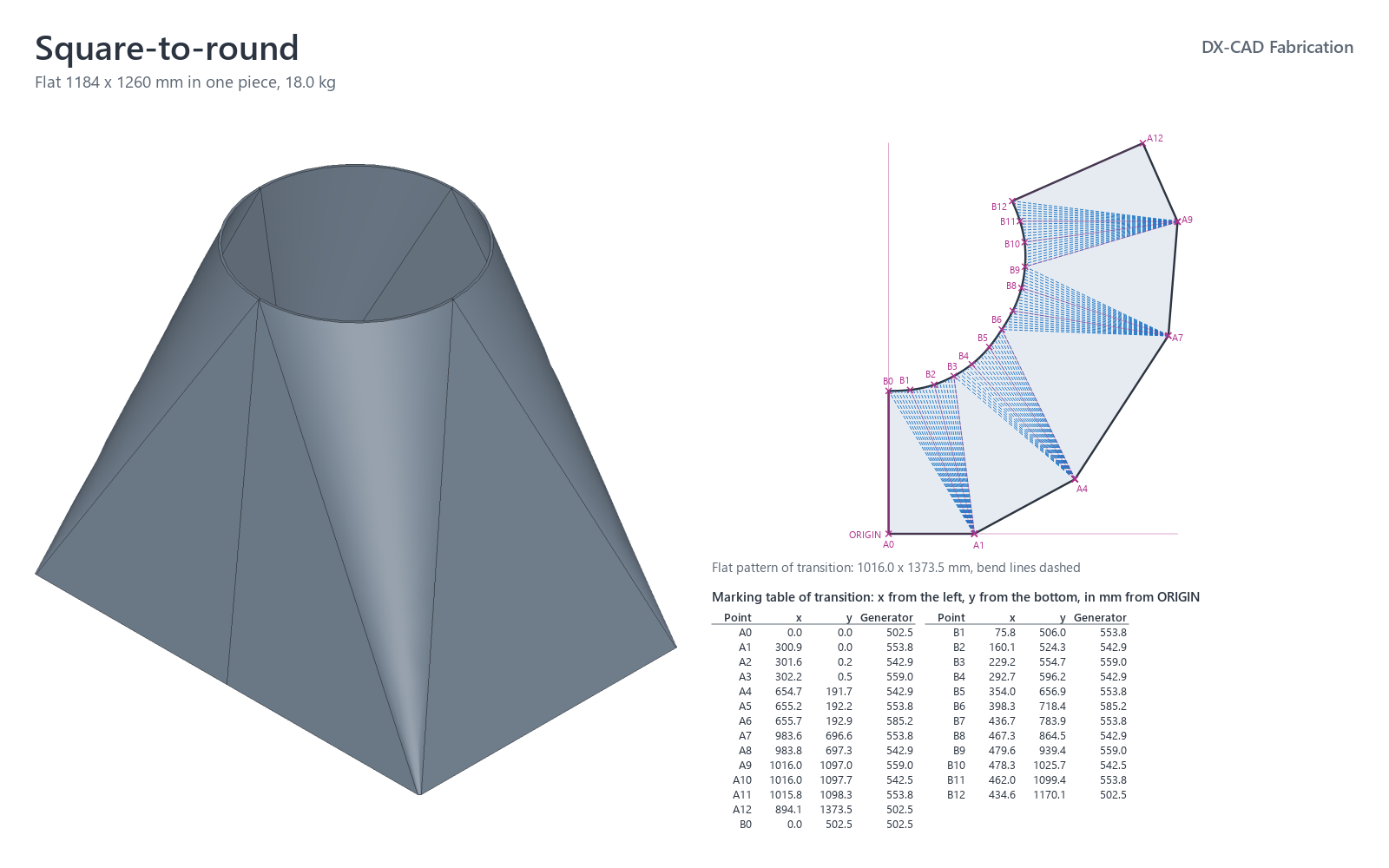
Square-to-round, rectangle-to-rectangle and round-to-round transitions, and hoppers, each with its seams and splits where you choose.
Elbows and branches
Segmented (lobster-back) and reducing elbows, tees, laterals, Y-pieces and breeches, headers, and branches on pipes, cones, elbows and plates.
Ducting and press-brake parts
Rectangular duct elbows, offsets and Y-branches; trays, boxes, brackets and corner posts for the press brake; dished heads; and weldments with cut lists.
Flat patterns you can trust
Thickness allowance
Each development allows for the plate's thickness, with the sizes taken to the face you choose.
Marking tables
Every flat comes with a marking table of points to set it out by hand, for the shop that still marks plate with a rule and a scriber.
Verified by refolding
Every shape family is checked over a grid of sizes by folding its flat pattern back up and comparing it with the 3D surface, and against closed-form values where they exist.
Out to the shop
Flats go out as DXF and SVG, onto drawings, and onto stock sheets with the nesting tool, each piece kept a gap from the next.
From sizes to the cutting table
- Pick the shape from the Fabrication menu and type its sizes in the dialog.
- Choose the plate thickness, where the seam goes and how many pieces.
- See the part in 3D and its flat pattern, with the marking table.
- Export the DXF, or nest the flats on your stock sheets, and put it on a drawing.
Questions
Is Fabrication part of DX-CAD?
It is an add-on. During your 30-day free trial it is unlocked with no key; after the trial it has a licence of its own.
How accurate are the flat patterns?
Each family is checked by refolding its flat against the 3D surface over a grid of sizes, and against closed-form values where they exist, in the add-on's own verification suite.
Can I mark out by hand?
Yes: every flat pattern has a marking table of the points to set it out on the plate.
What file goes to the plasma or laser?
A DXF of each flat, or of the flats nested on your stock sheets. SVG and drawings too.
Does it work with my bend tables?
Brake-formed shapes take their bend allowance from the gauge table of material and thickness. Bend a test strip on your own press, give the calibration wizard its measurements, and the table takes your press's figures.
Read more: Sheet metal in DX-CAD · Download the free trial